Continental Control Systems WattNode WNC-3D-BN
Three-phase electricity meter
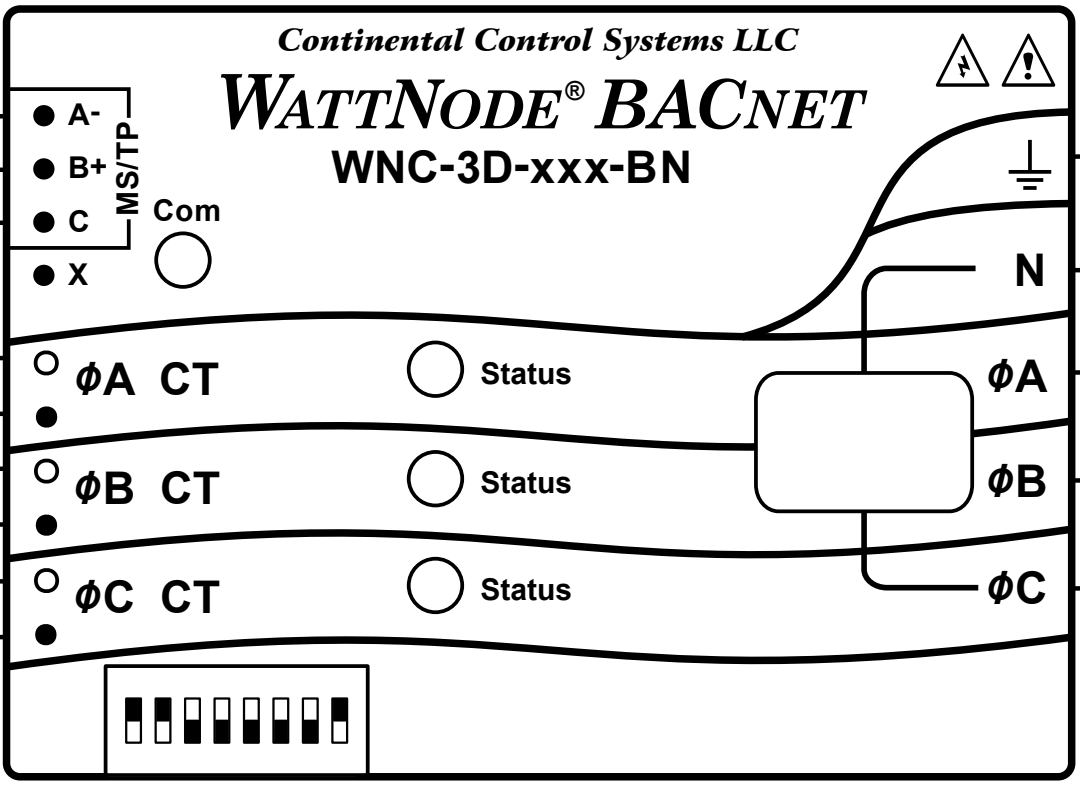
Use the WattNode 3D family when the survey calls for a CT-connected meter on a three-wire delta supply. Record the nominal line-to-line voltage and exact order code. On a 208 V delta service the matching model in the manufacturer’s table is WNC-3D-240-BN.
Compatibility
Compatible with Edge over routed BACnet MS/TP
The BN meter presents its own BACnet Device instance on RS-485. Edge reads it from the building IP network through a BACnet router.
The revision 1.12a object table covers meter firmware 1.12. Check the BN suffix, firmware and installed CT rating when adding the first point.
Connect it with

For a BN meter on an existing MS/TP trunk
- BACnet
- Edge
- Platforms
Models
| Models | Interface | Route into Edge |
|---|---|---|
| WNC-3D-240-BN | BACnet MS/TP. 208 or 240 V line-to-line delta service. | Select this reference for the stated service and use the router serving the meter trunk. |
| WNC-3D-400-BN | BACnet MS/TP. 400 V line-to-line delta service. | Select this reference for the stated service and use the router serving the meter trunk. |
| WNC-3D-480-BN | BACnet MS/TP. 480 V line-to-line delta service. | Select this reference for the stated service and use the router serving the meter trunk. |
Interface
Documented measurements and integration boundaries for WattNode WNC-3D-BN.
- Analog Input 3 (PowerSum) is the signed total real power in watts. Analog Inputs 4, 5 and 6 are the separate phase contributions.
- Analog Input 0 (EnergySumNR) is non-resettable net energy in kWh. Export reduces this total. Use the separate positive and negative counters where the report requires both directions.
Assessment
Read-only monitoring of the identified BN variants on a routed MS/TP segment.
- InteroperabilityWell supported
- The BACnet manual publishes Analog Input identifiers, object names and units.1
- AccuracySupported with conditions
- Choose the line-to-line voltage and confirm the signed phase sum for this delta service.1
- SecurityNot yet assessed
- The meter includes non-resettable energy counters. Network access depends on the building controls design.1
- ReliabilitySupported with conditions
- The meter stores energy totals in non-volatile memory. Record collection gaps separately from changes in the counter.1
- RuggednessSupported with conditions
- The manual specifies indoor use. Include the location and enclosure when assessing an existing board.1
- ScalabilitySupported with conditions
- The manufacturer specifies up to 64 WattNode meters per RS-485 subnet. Inventory other devices on a shared trunk before choosing a collection interval.1
- LifecycleSupported with conditions
- Retain the full voltage and protocol suffix when ordering a replacement. The WNC series has distinct electrical service ratings.2
Setup
-
Ask the site engineer for the meter label, service configuration and installed CT rating.
The WattNode expects CTs with a nominal one-third-volt output.
-
At a steady load, read Present_Value for Analog Input 3.
Compare watts and sign with an independent feeder reading at the same time. If total power is unexpected, record the individual phase contributions and ask the installer to check phase association and CT orientation.
-
Save the Device instance, object type, instance, units and location with the site point list.
Related devices
Sources
- WattNode BACnet installation and operation manual, revision 1.12a (opens in a new tab) (PDF)
- WNC series BACnet meter models and service voltages (opens in a new tab)
Further reading
Product names and trademarks belong to their owners. Publication does not imply endorsement or a commercial relationship.