Electro Industries/GaugeTech Shark 100
Power and energy meter
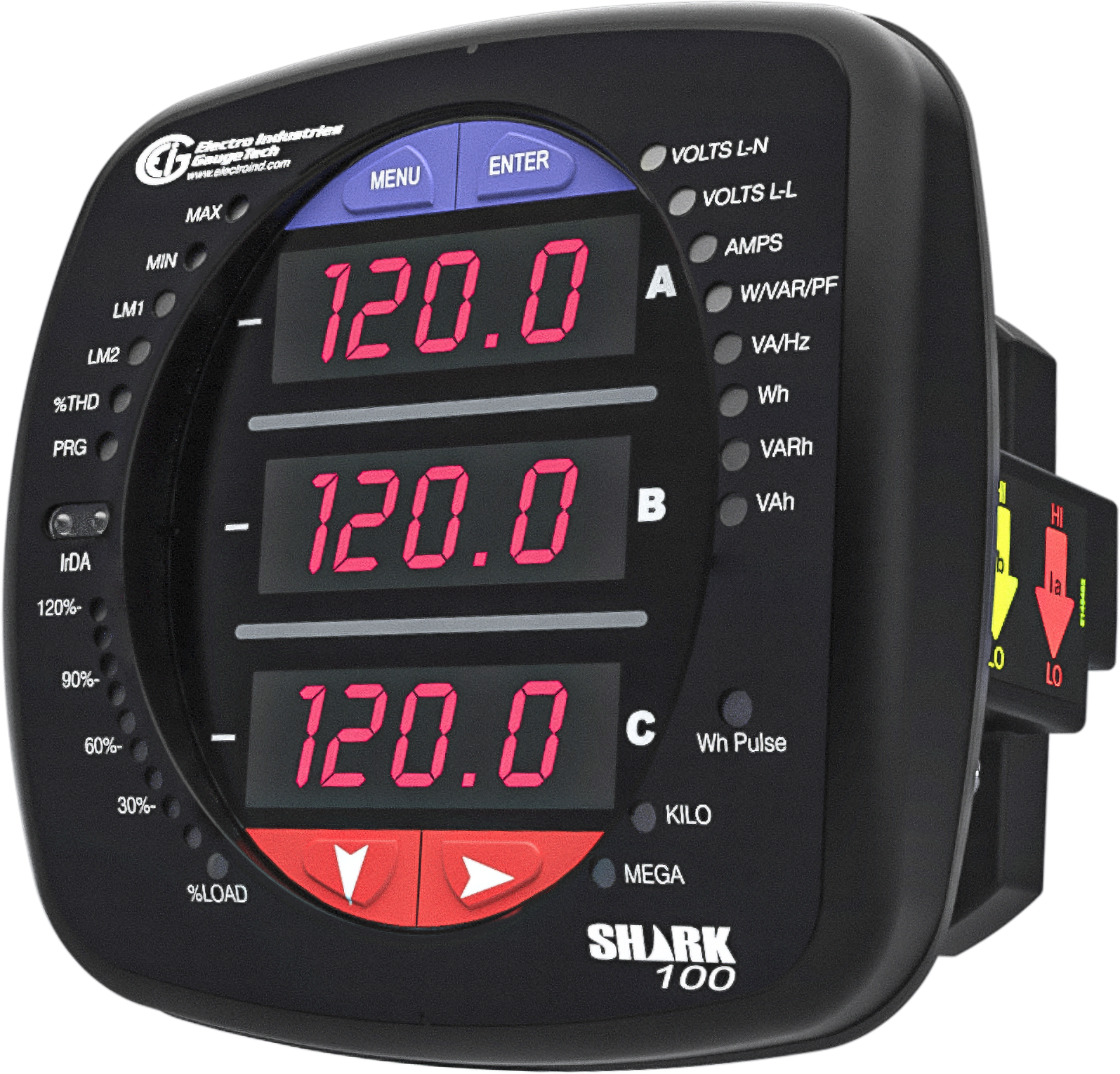
The Shark 100 is a multifunction power and energy meter from Electro Industries/GaugeTech (EIG) that fits ANSI 4-inch round and DIN panel cutouts; the Shark 100T is the same meter as a DIN-rail transducer with no display. Both read three-phase voltage and current through external 5 A or 1 A CTs. The meter's RS-485 port comes with the 485P option, standard on the 100T, and speaks Modbus RTU, Modbus ASCII or DNP3. EIG's map prints every address twice, once as the hex address sent on the wire and once as a decimal register number, and keeps voltage, current, power and frequency as 32-bit floats with the high word first. What the meter measures depends on its V-Switch: V1 is volts and amps only, V2 adds power and frequency, and V3 adds the energy counters.
Compatibility
Compatible with EpiSensor Edge over Modbus TCP or Modbus RTU
The Shark 100 and Shark 100T are compatible with EpiSensor Edge over Modbus RTU on the RS-485 port of the 485P option, read through a ZMB-31 Modbus Interface or a Gateway serial port, and over Modbus TCP on a Shark 100 fitted with the INP10 10/100BaseT option. EIG publishes the register map with hex and decimal addresses, data formats, word order, ranges and units in Appendix B of the manual.
Shark 100 with the 485P or INP10 communication option and the Shark 100T transducer, using the Modbus map in Appendix B of manual E145701 V.1.40. Site check: read Meter Type at hex address 0010 for the V-Switch, then compare Volts A-N with the display. Read-only monitoring: no writes to the commands section or the programmable settings.
Connect it with


For a meter in a switchboard or panel door where a wireless link avoids running a data cable back to the Gateway
- Modbus
- Wireless
- Edge
- Platforms
When the Gateway sits near the meter, or several meters share one wired RS-485 bus
- Modbus
- Edge
- Platforms
When the Shark 100 was ordered with the INP10 option instead of 485P
- Modbus
- Edge
- Platforms
Models
| Models | Interface | Route into Edge |
|---|---|---|
| Shark 100 with 485P | Panel meter with LED display; RS-485 with a KYZ pulse output on the rear (485P option); IrDA port on the front | Read the RS-485 port with Modbus RTU through a ZMB-31 or a Gateway serial port. The front IrDA port speaks Modbus ASCII only and is for configuration. |
| Shark 100 with INP10 | Panel meter with a 10/100BaseT RJ45 port and KYZ pulse output (INP10 option), which the brochure lists for Modbus TCP/IP | Read over Modbus TCP from the Gateway. Confirm the card's IP settings and unit identifier on site, then check one value against the display. |
| Shark 100T | DIN-rail transducer with no display or buttons, programmed through its communication port; RS-485 with KYZ pulse (485P) is standard, with terminals +, - and SH | Same Modbus RTU route and the same map. Meter Type at hex 0010 returns the transducer bit set. |
| Shark 100 with COM option X | No rear communication port; only the front IrDA port | No Edge route. The meter needs the 485P or INP10 option before it can be read. |
Specifications
The Shark 100 is a three-phase multifunction meter that samples at more than 400 samples per cycle with 24-bit converters and reports voltage, current, power, power factor, frequency, energy, demand and, with V-Switch 4, THD and limit alarms. The Shark 100T is the same meter as a DIN-rail transducer with no display. The rear communication port is ordered as an option: 485P for RS-485 with a KYZ pulse output, standard on the 100T, or INP10 for 10/100BaseT Ethernet.12
- Models
- Shark 100 panel meter and Shark 100T DIN-rail transducer. Order code fields: frequency 50 or 60, current 10 (5 A) or 2 (1 A), V-Switch V1 to V4, power supply D2 or D, COM X, 485P or INP10, mounting X (ANSI) or DIN.12
- V-Switch
- V1 volts and amps; V2 adds kW, kVAR, PF, kVA and frequency; V3 adds kWh, kVAh, kVARh and DNP3; V4 adds THD monitoring and limit alarms. A higher V-Switch is enabled in the field through communication.12
- Voltage inputs
- Up to 416 V L-N and 721 V L-L; performs to specification on 69, 120, 230, 277 and 347 V systems; 3 element wye, 2.5 element wye, 2 element delta and 4-wire delta; programmable to any PT ratio; measurement category III.12
- Current inputs
- Class 10: 0.005 to 10 A, 5 A nominal CT secondary. Class 2: 0.001 to 2 A, 1 A nominal. Fault withstand 100 A for 10 s, 300 A for 3 s, 500 A for 1 s; CT leads pass through (4.5 mm maximum) or terminate on the meter.2
- Accuracy
- Voltage and current 0.1% of reading; watts, VARs, VA, Wh, VARh, VAh and power factor 0.2%; frequency ±0.01 Hz. ANSI C12.20-2010 class 0.2 CL and IEC 62053-22 class 0.2S for 3 element wye and 2 element delta; add 0.1% of full scale plus 1 digit for 2.5 element connections.2
- Communication
- Rear RS-485 (485P option) with Modbus RTU, Modbus ASCII or DNP3 (V3 and V4); 9600, 19200, 38400 or 57600 baud; address 1 to 247; 8 data bits, no parity; factory settings 57600 baud, address 001, Modbus RTU. Front IrDA port with Modbus ASCII at 57600 baud, address 1. INP10 option: 10/100BaseT Ethernet with Modbus TCP/IP, factory IP address 10.0.0.1.12
- Update rate
- Watts, VARs and VA every 6 cycles; all other parameters once a second.2
- Power supply
- D2: 90 to 265 V AC at 50/60 Hz or 100 to 370 V DC, 5 VA maximum. D: 18 to 60 V DC, 3.5 W maximum.2
- Housing
- Shark 100: 123.2 × 123.2 × 105.4 mm, 0.907 kg; mounts in ANSI C39.1 4-inch round and DIN square cutouts; Shark 100T on DIN rail. Faceplate NEMA 12 with gasket; IP30 front and back.12
- Environment
- Operating -20 to +70 °C, storage -20 to +70 °C, humidity to 95% RH non-condensing; all inputs and outputs galvanically isolated to 2500 V.2
- Approvals
- Certified to UL 61010-1 and CSA C22.2 No. 61010-1 (UL file E250818); CE to IEC 61000-6-2, IEC 61000-6-4 and IEC 61326-1; IEEE C37.90.1 surge withstand.2
Interface
Documented measurements and integration boundaries for Shark 100.
- Every row of the map gives a hex address and a decimal register number: Volts A-N is hex 03E7 to 03E8 and decimal 1000 to 1001. The hex value is the address sent in the Modbus frame, and the decimal number is that address plus one. The manual does not list function codes; Edge reads the map with FC03, and the Meter Type read in the worked example confirms the meter answers it.
- FLOAT is a 32-bit IEEE value in two registers and SINT32 or UINT32 a 32-bit integer in two registers. For both, the manual states that the lower-addressed register is the high-order half.
- Primary readings, FLOAT, in the map's 60-cycle block: Volts A-N, B-N and C-N at registers 1000, 1002 and 1004 (hex 03E7, 03E9, 03EB) and A-B, B-C and C-A at 1006, 1008 and 1010, in volts; Amps A, B and C at 1012, 1014 and 1016 in amps; neutral current at 1028.
- Three-phase totals, FLOAT: watts at 1018 (hex 03F9), VARs at 1020, VAs at 1022, power factor at 1024 (-1.00 to +1.00) and frequency at 1026 (hex 0401) in Hz. Power is in watts, not kilowatts. The map has no per-phase power.
- A faster copy of watts, VARs and VAs, averaged over 6 cycles, sits at registers 900, 902 and 904 (hex 0383, 0385, 0387) as FLOAT.
- Energy, SINT32 with an implied decimal point: W-hours received 1100 (hex 044B), delivered 1102, net 1104 and total 1106; VAR-hours positive 1108, negative 1110, net 1112 and total 1114; VA-hours total 1116. Each counter holds 5 to 8 digits.
- Energy scale comes from the Power & Energy Format register 30006 (hex 7535), bit-mapped pppp--nn -eee-ddd: eee is the energy scale (0 units, 3 kilo, 6 mega) and ddd the digits after the decimal point (0 to 6). The value in Wh is the register divided by 10 to the power ddd, times 10 to the power eee.
- Wh received and Wh delivered always have opposite signs. Received is positive when the meter is set to view as load and delivered is positive when it is set to view as generator (power direction bit w in register 30015).
- Fixed data: Meter Name at registers 1 to 8 and serial number at 9 to 16 as ASCII, two characters per register; Meter Type at 17 (hex 0010) with bit t set for the transducer model and the V-Switch number 1 to 4 in the low three bits; firmware version at 18 to 19 and map version at 20.
- V-Switch sets the readings: V1 volts and amps, V2 adds watts, VARs, VAs, power factor and frequency, V3 adds the Wh, VARh and VAh counters, and V4 adds %THD and limits. THD at 4000 to 4005 is UINT16 in 0.1% and reads 65535 when not available.
- Demand averages are at 2000 to 2019, minimums at 3000 to 3033 and maximums at 3100 to 3133, all FLOAT. Phase angles at 4100 to 4105 are SINT16 in 0.1 degree.
- Meter Status at register 5000 (hex 1387) holds the state in its low byte: 1 is Run and 2 is Limp. Meter Data Section registers read 0 until the first readings are available or when the meter is not in operating mode, and unlisted registers also read 0, so do not store a run of zeros as a measurement.
- The Secondary Readings block from 40001 carries 12-bit values from 0 to 4095 with fixed offsets (Volts A-N 2047 is 0 V and 4095 is 150 V). It is meant for analogue-style transducer use; read the primary floats instead.
- Write registers: reset max/min 20000, reset energy 20001 and 40100, programmable settings 22000 to 22004, firmware reprogramming 23000, forced restart 25000, secure operations 26000 to 26011 (an encrypted command to read the password or change the meter type) and the settings block 30000 to 30067. The meter ships with passwords disabled and has no default password; the map says to use 5555 as the password while passwords are disabled. Keep all of them out of a monitoring poll.
Assessment
Shark 100 with the 485P or INP10 communication option and the Shark 100T transducer, using the Modbus map in Appendix B of manual E145701 V.1.40. Site check: read Meter Type at hex address 0010 for the V-Switch, then compare Volts A-N with the display. Read-only monitoring: no writes to the commands section or the programmable settings.
- InteroperabilitySupported with conditions
- EIG documents Modbus RTU on RS-485 and Modbus TCP/IP on the INP10 card, and publishes a map with hex and decimal addresses, data formats, word order, ranges and units. The port is an ordering option, the readings available depend on the V-Switch, and the manual names no Modbus function codes and no TCP port for the INP10 card.12
- AccuracySupported with conditions
- Class 0.2 to ANSI C12.20 and 0.2S to IEC 62053-22, 0.1% voltage and current, and separate received, delivered, net and total energy counters. Power is published only as three-phase totals, the energy counters need the format register and V3 or V4, and accuracy also depends on the CTs and ratios set on the meter.12
- SecurityLimited
- Reset and configuration passwords are optional; the meter ships with them disabled and no default password, and the map then accepts 5555 for reset, programming and firmware commands over Modbus. Modbus RTU and Modbus TCP have no encryption or peer authentication, and the INP10 card is configured over Telnet on port 9999. Keep the bus and network private and the client read-only.1
- ReliabilitySupported with conditions
- The brochure lists EMC immunity tests to IEC 61000-4-2 to 4-11 and IEEE C37.90.1 surge withstand, and Meter Status at register 5000 reports Run or Limp and EEPROM block flags for energy and settings. Data registers read 0 before the first readings or outside operating mode, so a poll must treat zeros with care.12
- RuggednessSupported with conditions
- Rated -20 to +70 °C operating, to 95% RH non-condensing, with a NEMA 12 faceplate and gasket, IP30 front and back, measurement category III inputs and current inputs that withstand 100 A for 10 s. The body needs a switchboard or enclosure.12
Setup
Read Meter Type at register 17, then Volts A-N at register 1000
Appendix B of manual E145701 V.1.40 lists Meter Type at hex 0010 (decimal register 17) as a bit-mapped UINT16, Volts A-N at hex 03E7 to 03E8 (decimal 1000 to 1001) as FLOAT in volts, the Power & Energy Format at hex 7535 (decimal 30006) and W-hours received at hex 044B to 044C (decimal 1100 to 1101) as SINT32. The map prints both columns, so the address convention is fixed by the document: send the hex value.
- Request
- 01 03 00 10 00 01 85 CF: Modbus address 1, FC03, address 0x0010 (the map's hex column for decimal register 17), one register, RTU CRC.
- Address convention
- The hex column is the zero-based address on the wire and the decimal column is one-based: hex 0010 is register 17, hex 03E7 is register 1000. A client that numbers holding registers from one takes 17 and 1000 (or 40017 and 41000). Sending 0x03E8 for Volts A-N starts one register late.
- Synthetic response
- 01 03 02 00 03 F8 45: two data bytes, 00 03.
- Decode
- Meter Type 0x0003, bit-mapped -------t -----vvv: t is 0, so a Shark 100 with display, and vvv is 3, so V-Switch 3 with power, frequency and the energy counters.
- Voltage read
- 01 03 03 E7 00 02 74 78 reads two registers from 0x03E7. Synthetic response 01 03 04 42 F0 CC CD 7A ED: high-order word 0x42F0 first, then 0xCCCD, so the float is 0x42F0CCCD = 120.4 V.
- Energy read
- 01 03 75 35 00 01 8E 08 reads the Power & Energy Format; synthetic response 01 03 02 83 31 18 A0 gives 0x8331, whose low byte 0x31 means energy scale 3 (kilo) and 1 digit after the decimal point. Then 01 03 04 4B 00 02 B5 2D reads W-hours received; synthetic response 01 03 04 00 01 E2 40 E2 A3 gives 0x0001E240 = 123456, so 12345.6 kWh.
- Acceptance
- Keep the points when Volts A-N agrees with the VOLTS L-N screen and Wh received agrees with the Wh screen at the same time. A float read one register late straddles two values and will not normally decode to the displayed voltage.
Acceptance: The response bytes are a synthetic decoder check, not a captured meter reply. A real reply must show the expected V-Switch and a voltage that agrees with the display before current, power and energy points are enabled.
-
Identify the meter and its options
Read the order code on the label. The meter needs COM option 485P (or INP10 for Ethernet); a Shark 100 with COM option X has only the front IrDA port. Note the V-Switch, because power and frequency need V2 and the energy counters need V3.
-
Read the port settings
On a Shark 100, Configuration mode shows the PORT screens: address (Adr), baud rate (bAUd) and protocol (Prot), which must be set to Modbus RTU. From the factory the port runs at 57600 baud, address 001. A Shark 100T has no display, so read its profile with EIG's CommunicatorPQA software. Enter the same address and baud rate, with 8 data bits and no parity, in the Edge serial client or the ZMB-31.
-
Wire the RS-485 pair
Connect + to +, - to - and the shield to SH on the meter's RS-485 terminals with shielded twisted pair, ground the shield at one end and daisy-chain any further meters without stubs.
-
Confirm the meter and its V-Switch
Send FC03 for one register to hex address 0010, the Meter Type register. The low three bits give the V-Switch (1 to 4), and bit 8 is set on a Shark 100T.
-
Compare one value with the display
Read Volts A-N from hex 03E7 as a float with the high word first and compare it with the VOLTS L-N screen, then add current, power, frequency and, on V3 or V4, the energy counters.
-
Scale the energy counters
Read the Power & Energy Format register at hex 7535 once, apply its energy scale and decimal digits to the Wh and VARh counters, and compare Wh received with the display. Never write to the commands section or the settings block.
Common questions
- Do I send the hex or the decimal address from the Shark 100 map?
- Send the hex value. Every row of EIG's map gives both: Volts A-N is hex 03E7, which is decimal register 1000. The hex column is the address in the Modbus frame and the decimal column is that address plus one, so a tool that numbers registers from one takes 1000.1
- Why does the Shark 100 not show power or energy over Modbus?
- Check the V-Switch. Meter Type at register 17 (hex 0010) holds it in the low three bits: V1 is volts and amps only, V2 adds power, power factor and frequency, and V3 adds the energy counters. The map also says meter data registers read 0 until the first readings are available or when the meter is not in operating mode.12
- How do I scale the Shark 100 energy registers?
- The Wh, VARh and VAh counters from register 1100 are SINT32 integers with an implied decimal point. Read register 30006 (hex 7535): bits 6 to 4 give the energy scale (0 units, 3 kilo, 6 mega) and bits 2 to 0 the digits after the decimal point. A counter of 123456 with kilo and one decimal digit is 12345.6 kWh. The map notes that energy registers should be reset after a format change, so read the format register again if the counters change scale.1
- Does the Shark 100 separate imported and exported energy?
- Yes. W-hours received at register 1100 and delivered at 1102 are separate counters with opposite signs, with net at 1104 and total at 1106; VAR-hours have positive and negative counters at 1108 and 1110. Which direction counts as received depends on the power direction setting: received is positive for view as load and delivered is positive for view as generator.1
- Does the Shark 100 have Modbus TCP?
- Only with the INP10 option, a 10/100BaseT Ethernet card for Modbus TCP/IP. Manual V.1.40 sets the card up over Telnet on port 9999 from its factory address 10.0.0.1 and takes the Modbus address from the unit identifier in each request. The 485P option gives the RS-485 port instead, the front IrDA port speaks Modbus ASCII only, and a meter ordered with COM option X has no rear port.12
- How do I find the settings of a Shark 100T with no display?
- Use EIG's CommunicatorPQA software over the RS-485 port. The manual describes a default communication mode: poll the meter within 5 seconds of power-up at 9600 baud, address 001, with Modbus RTU, and it keeps those settings until 5 minutes pass with no activity, long enough to read its programmed address and baud rate. Then set the same values in Edge.1
Related devices

Sources
- Shark 100/100T/100B/100BT/50/50B User Manual, Doc # E145701 V.1.40 (7 August 2026), with Appendix B Modbus maps and the Shark 100 register map MM-1 to MM-8 (opens in a new tab) (PDF)
- Shark 100 multifunction power and energy meter brochure, E145702 V.1.25 (May 2026), with specifications and ordering information for the Shark 100 and Shark 100T (opens in a new tab) (PDF)
Further reading
Product names and trademarks belong to their owners. Publication does not imply endorsement or a commercial relationship.