Diehl Metering SHARKY 775 Modbus
Heat and cooling energy meter
SHARKY 775 is an ultrasonic heat and cooling energy meter with optional communication modules. With Diehl's powered Modbus RTU module installed, its measurements are available over EIA-485. The module manual gives exact read registers and an example energy request, so an installer can start with a read-only check before adding power, flow and temperature.
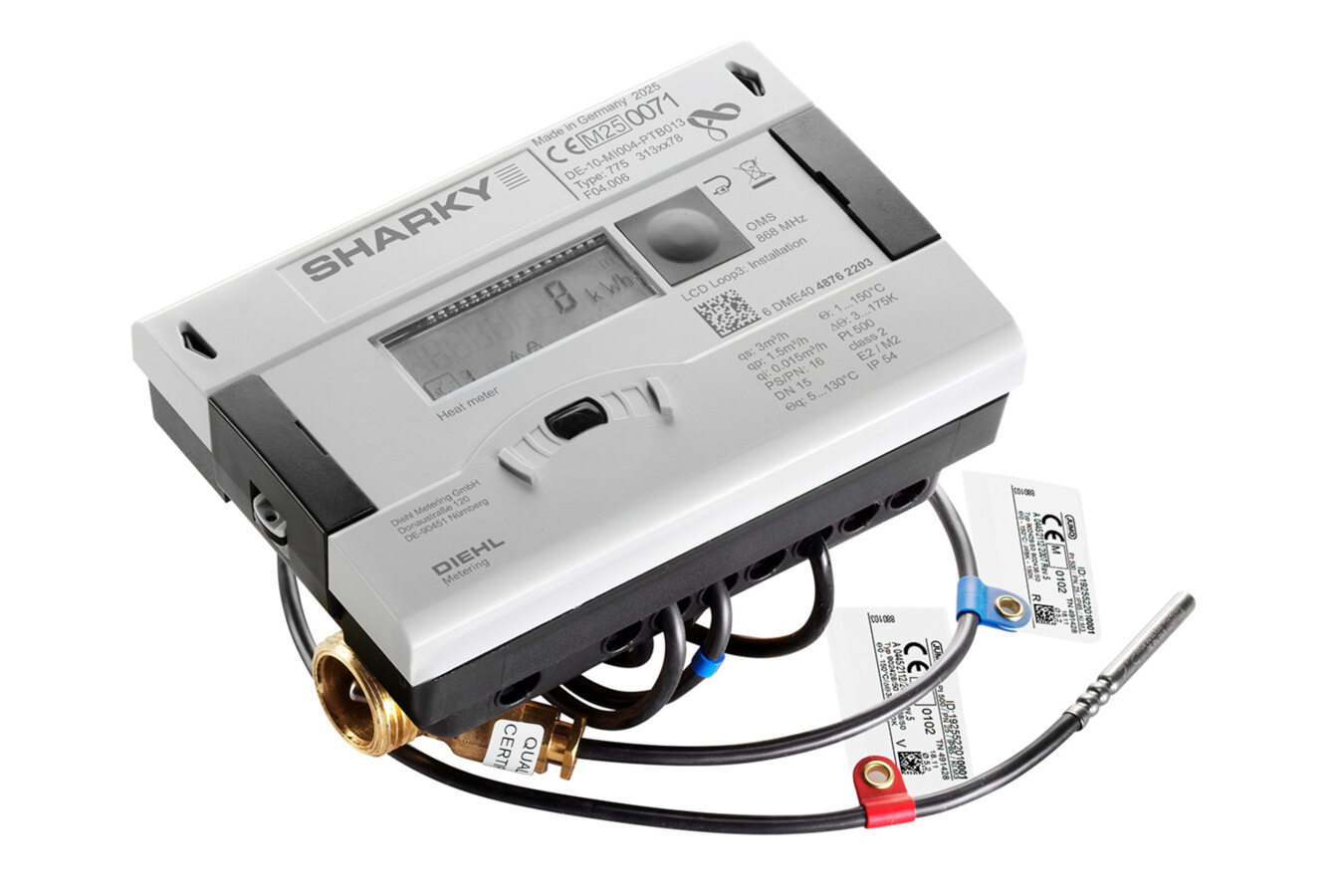
- Modbus RTU
Heat and cooling energy meter
Compatibility
Read through the installed Modbus RTU module
Diehl publishes the SHARKY 775 module's EIA-485 settings, register table and a complete FC04 energy example. Edge can use a commissioned serial Modbus interface for read-only monitoring; this is a documented starting point, not a physical test of this meter.
This path requires the optional Diehl Modbus RTU module in a SHARKY 775. It does not describe the meter's separate M-Bus, wireless M-Bus, RS485-with-M-Bus-protocol or pulse modules. The read example follows Diehl's December 2023 module guide; compare it with the installed module and front display before expanding the point list.
Connect it with
-
Modbus Interface ZMB-3XFrom €399 ex VAT Configure Modbus Interface
-
Gateway ZGW-20From €899 ex VAT Configure Gateway


When a SHARKY 775 has the optional powered Modbus RTU module and an approved isolated serial interface is available
- Modbus
- Edge
- Platforms
Models
| Models | Interface | Route into Edge |
|---|---|---|
| SHARKY 775 plus Modbus RTU communication module | Powered optional EIA-485 Modbus RTU module; factory serial defaults 9600 bit/s, 8N1 | Read the module's measurement registers through an approved serial Modbus interface. |
| SHARKY 775 with M-Bus or RS485 M-Bus module | Different communication modules and protocol | Use an M-Bus master and the selected module's documentation; this Modbus table does not apply. |
| SCYLAR INT 8 plus the same Modbus RTU module | Also named in Diehl's module guide | Confirm that meter's own configuration before reusing this read procedure. |
Specifications
SHARKY 775 is an ultrasonic compact energy meter for heating and cooling. Diehl offers optional plug-in communication modules, so the physical meter model alone does not determine its external protocol.1
- External read interface
- Optional Modbus RTU module on EIA-485; other communication modules are separate12
- Module supply
- 12–24 V AC/DC at terminals 60/61, separate from terminals 90/91 for EIA-4852
- Measurement read
- FC04 input or FC03 holding register reads; energy starts at zero-based offset 02
- Energy representation
- Signed Int32 with separate UInt16 factor and unit, or a convenience IEEE-754 float2
Interface
Documented measurements and integration boundaries for SHARKY 775 Modbus.
- Thermal energy: signed 32-bit integer at input 30001 or holding 40001, wire offset 0, multiplied by the separate unit factor at offset 2; unit name starts at offset 3 and unit code is at offset 7.
- Volume and power begin at offsets 10 and 20; flow begins at offset 30. Each has an integer value, unit factor, unit name and convenient float representation in the documented register group.
- Flow and return temperatures are provided in their own groups, with unit information. Error code and meter identity can be read separately.
- Keep thermal energy and volume counters distinct from instantaneous power and flow. Preserve the reported unit: the module can be configured for MJ, GJ, kWh or other published units.
Assessment
SHARKY 775 with Diehl Modbus RTU module, using the December 2023 public register guide. This is a documented read starting point; no physical EpiSensor installation or billing validation is claimed.
- InteroperabilityWell supported
- Diehl publishes serial settings, register types, address convention and a complete energy request.2
- AccuracyWell supported
- The meter is specified for heating and cooling energy measurement, and the module exposes energy, power, flow and temperature values with units.12
- SecurityNot yet assessed
- The retained serial module guide does not describe authentication or encryption on EIA-485.2
- ReliabilitySupported with conditions
- The unit and factor registers permit explicit decoding; communication freshness and failed polls must be handled by the client.2
- RuggednessSupported with conditions
- The compact meter is intended for heating and cooling installations; the module has separate supply and EIA-485 terminals that require correct panel wiring.12
- ScalabilitySupported with conditions
- Modbus permits unique IDs on a multi-drop EIA-485 bus; automatic IDs must be checked to avoid collisions.2
Setup
Read the module's first thermal-energy value
Diehl's December 2023 manual gives this complete example for a meter whose serial ends in 026 and whose automatic slave-ID mode therefore selects address 26. Use the installed address rather than copying 26 to another meter.
- Function
- FC04 Read Input Registers; FC03 Holding Registers also exposes measurement data
- Document reference
- 30001 for energy, 30003 for its factor, 30004 for its unit name and 30008 for its unit code
- PDU start and length
- Offset 0 (0x0000), 10 registers (0x000A); subtract 30001 from an input-register reference
- Example request
- Slave 0x1A, function 0x04, start 0x0000, count 0x000A; the manual's complete RTU frame ends CRC 0x73E6
- Integer decode
- Energy words 0x0000 0x3039 = 12,345 as signed Int32, most significant word and byte first
- Unit factor and unit
- Factor 0x0001 = 1; ASCII unit MJ; unit code 0x0008 also means MJ
- Result
- 12,345 × 1 MJ = 12,345 MJ = 12.345 GJ in Diehl's worked example
Acceptance: This is Diehl's documented sample frame, not a reading from an EpiSensor installation. On site, read the actual slave and compare the decoded energy and unit with the meter display. Prefer the integer plus unit factor for cumulative energy: Diehl notes that its convenience float can lose display precision.
-
Identify the module
Check the SHARKY 775 nameplate and fitted slot module. The separate RS485 M-Bus option is not a Modbus RTU endpoint.
-
Confirm power and serial wiring
The Modbus module needs a 12–24 V AC/DC SELV supply on terminals 60/61. Its EIA-485 data terminals are 90 (+) and 91 (-). Follow Diehl's installation instructions and have the panel installer verify the wiring.
-
Discover the slave
Start with 9600 bit/s, 8 data bits, no parity and one stop bit if settings are unknown. Automatic addressing is enabled by default and derives the slave ID from the meter's secondary address; read the actual address from the display or commissioning record.
-
Read energy first
Use FC04, start 0, count 10. Decode the signed energy integer and its factor and unit, then compare with the front display. Add power, flow and temperature from Diehl's table after this first read agrees.
Common questions
- Is every SHARKY 775 a Modbus meter?
- No. Modbus RTU is one optional module. Check the fitted module; Diehl also offers M-Bus and other interfaces, including an RS485 module that speaks M-Bus rather than Modbus.1
- Why does the energy value differ from the display?
- Check the unit and the factor register before converting. Diehl recommends the Int32 value multiplied by its unit factor for cumulative energy because the convenient float representation can lose precision. Also compare readings taken at the same time.2
- Is the Modbus slave always address 1?
- No. Automatic addressing is enabled by default and can derive the ID from the meter's secondary address. Diehl's example meter ends in 026 and uses slave 26; the installed module may differ.2
Related devices
Sources
- SHARKY 775 ultrasonic thermal energy meter (opens in a new tab)
- Modbus RTU communication module user guide, December 2023 (opens in a new tab) (PDF)
Further reading
Product names and trademarks belong to their owners. Publication does not imply endorsement or a commercial relationship.