SmartGen HGM6120N
Single-generator AMF controller
HGM6120N provides automatic mains-failure control and local generator monitoring. The suffix matters: the basic N controller does not have the RS-485 monitoring interface documented for HGM6120NC. Selecting the right variant is more useful than assuming every HGM6100N-family unit supports Modbus.
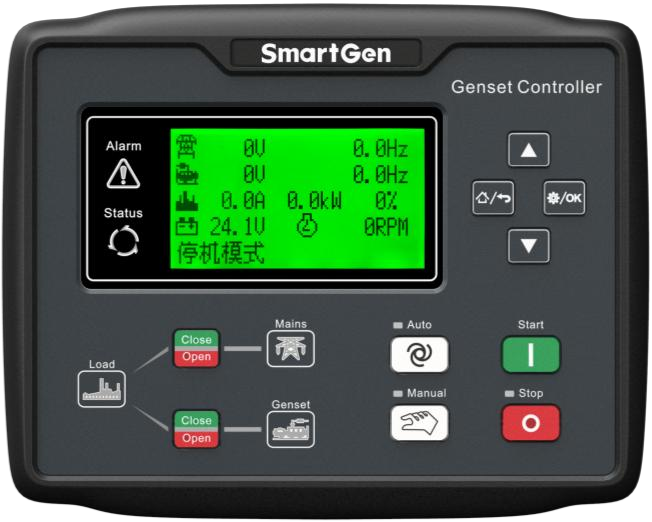
Single-generator AMF controller
Compatibility
Controller selection and monitoring options
USB configuration on HGM6120N; RS-485 Modbus is an HGM6120NC feature
N, NC and CAN are separate variants. NC adds RS-485 communication; CAN adds the engine communication capability shown in the family manual. The 6110 models are auto start, while 6120 models also supervise the mains.
Models
| Models | Interface | Route into Edge |
|---|---|---|
| HGM6120N | USB configuration on HGM6120N; RS-485 Modbus is an HGM6120NC feature | Check the full rear-label model and terminal diagram. Use the USB configuration route to retain the panel settings. For an existing N controller, obtain generator electrical monitoring through a separate meter and panel status signals; use the NC variant when a controller Modbus route is required. |
Specifications
N, NC and CAN are separate variants. NC adds RS-485 communication; CAN adds the engine communication capability shown in the family manual. The 6110 models are auto start, while 6120 models also supervise the mains.12
- Plant role
- Single-generator AMF controller1
- Monitoring and configuration
- USB configuration on HGM6120N; RS-485 Modbus is an HGM6120NC feature2
- Model distinction
- N, NC and CAN are separate variants. NC adds RS-485 communication; CAN adds the engine communication capability shown in the family manual. The 6110 models are auto start, while 6120 models also supervise the mains.12
- Panel protection
- IP55 with the specified panel gasket.1
Interface
Documented measurements and integration boundaries for HGM6120N.
- Generator and mains electrical measurements on the controller display
- Engine running state, run hours and configured analogue measurements
- Alarm and breaker indications within the existing standby panel
Assessment
USB configuration on HGM6120N; RS-485 Modbus is an HGM6120NC feature
- InteroperabilityNot yet assessed
- USB configuration on HGM6120N; RS-485 Modbus is an HGM6120NC feature
- AccuracySupported with conditions
- The documentation identifies electrical and operating measurements for this plant role. CT configuration and measurement location determine how those values are used.12
- SecurityNot yet assessed
- The cited documentation does not establish an authenticated, encrypted Edge monitoring connection.
- ReliabilityNot yet assessed
- The controller application distinguishes operating conditions and alarms. Retain communication availability alongside the plant readings.
- RuggednessSupported with conditions
- IP55 with the specified panel gasket.1
- ScalabilityNot yet assessed
- Assign one device identity per controller and keep generator, mains and busbar measurements separate.
Setup
-
Check the full rear-label model and terminal diagram.
Use the USB configuration route to retain the panel settings. For an existing N controller, obtain generator electrical monitoring through a separate meter and panel status signals; use the NC variant when a controller Modbus route is required.
-
Record CT ratios and the physical measurement location.
Compare the first electrical values with the controller display before using them in totals or trends.
-
Keep missing responses distinct from a stopped generator.
Store communication availability beside running state so a disconnected cable does not look like healthy standby.
Related devices
Sources
Further reading
Product names and trademarks belong to their owners. Publication does not imply endorsement or a commercial relationship.