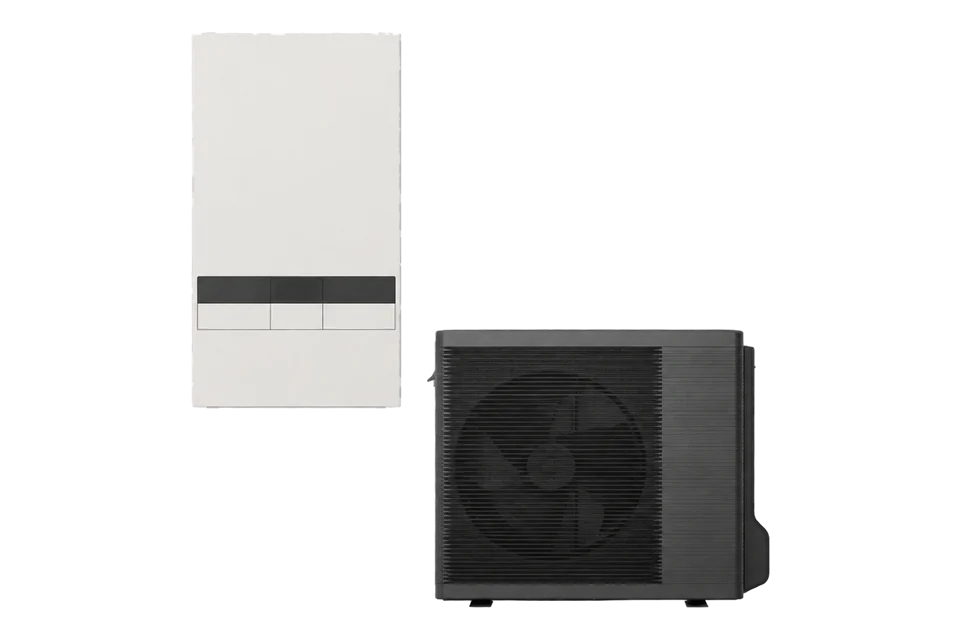
Panasonic Aquarea KIT-WC09K3E5
Air-to-water heat pump
Monitor this K-generation heat pump through a separate Intesis INMBSPAN001A100 Modbus RTU gateway. HMS publishes K-series temperature and energy registers, so an installer can start with a read-only comparison at the controller. Delivered heat and whole-system COP still need independent meters.
Compatibility
Compatible with EpiSensor Edge over Modbus RTU through an Intesis gateway
HMS names INMBSPAN001A100 as the successor to the legacy A000 and supports Aquarea H/J/K/L/M series. Its v1.0.2 manual documents a wired hydro-unit connection, Modbus RTU server settings and K-series read-only registers. The exact-model lookup still shows the older A000 and cautions about control signals; this guide uses the newer gateway's published map as a best-effort monitoring starting point.
For KIT-WC09K3E5, match the WH-SDC0309K3E5 indoor and WH-UDZ09KE5 outdoor nameplates, fit the INMBSPAN001A100 to the hydro-unit socket and compare live reads with the local controller. Confirm the installed gateway revision and available values during commissioning. No write or demand-response command is covered.
Connect it with


The K-generation hydro unit has a commissioned INMBSPAN001A100 gateway on its supplied connection cable
- Wired
- Edge
- Platforms
Models
| Models | Interface | Route into Edge |
|---|---|---|
| WH-SDC0309K3E5 indoor unit | K-generation hydro unit; optional BMS integration via a separately selected gateway | Connect the separately fitted A100 gateway to the hydro-unit control-board socket, then compare read-only values with the indoor controller. |
| WH-UDZ09KE5 outdoor unit | Paired outdoor unit in KIT-WC09K3E5 | Do not treat the outdoor model as a Modbus server or as a substitute for the indoor-unit lookup. |
| INMBSPAN001A000 / INMBSPAN001A100 | Separate Intesis EIA-485 Modbus RTU gateway families | Use the A100 map for a read-only trial. The exact-model lookup names legacy A000 and its warning concerns sufficient signals for control, not the A100's published K-series read registers. |
Specifications
Panasonic's KIT-WC09K3E5 couples the WH-SDC0309K3E5 indoor unit with the WH-UDZ09KE5 outdoor unit. Its model page describes optional BMS integration, not a built-in Modbus RTU server.1
Interface
Documented measurements and integration boundaries for Aquarea KIT-WC09K3E5.
- The A100 map lists outdoor temperature at zero-based register 1, outlet-water temperature at 2 and inlet-water temperature at 3. SW4 selects Celsius, tenths of a degree Celsius or Fahrenheit; compare the decoded value with the local controller.
- The gateway, when fitted, is the Modbus server. The Panasonic indoor unit is connected through the gateway's Aquarea interface, not directly to an Edge Modbus port.
- The A100 manual marks heat-mode energy consumption and generation at zero-based registers 360 and 363 as K-series onward, in W. Its accumulated consumption at 366-367 and heat generation at 368-369 are two-register Wh values. Treat these as controller-reported operating data, not revenue-grade metering.
- Controller values do not establish delivered heat or whole-system COP. Use an independent heat meter and electricity meters across the declared measurement boundary.
- No heating mode, setpoint, DHW, defrost, SG Ready or demand-response write is approved by this guide.
Assessment
Read-only KIT-WC09K3E5 monitoring through the A100 gateway and the v1.0.2 map. Compare live K-series values with the local controller; independent meters define a COP boundary.
- InteroperabilityLimited
- HMS supports K-series through the A100 gateway and publishes its Modbus RTU map. The legacy exact-model lookup's control warning does not validate writes here.245
- AccuracyLimited
- The A100 manual documents K-series temperature and energy reads. They support operational monitoring, while delivered thermal output and whole-system electricity require independent meters.24
- SecurityNot yet assessed
- Physical EIA-485 access and project segregation need review; the retained sources do not establish Edge-side access control for this specific installation.34
- ReliabilityLimited
- The A100 supplies a documented server and invalid-value conventions; compare live reads with the local controller and inspect its communication LED.24
- RuggednessNot yet assessed
- The kit and gateway are manufacturer-documented products, but their environmental limits have not been checked against an installed site.13
Setup
Read outlet-water temperature through the A100 gateway
HMS INMBSPAN001A100 manual v1.0.2 lists outlet-water temperature at Modbus protocol address 2 (PLC address 3). This is a read-only first check on the gateway, not a command to the heat pump.
- Target
- A100 server address 1 by default, 9600 baud, 8 data bits, no parity; one or two stop bits auto-detected
- Function
- FC03 Read Holding Registers or FC04 Read Input Registers
- PDU start
- 2 decimal (zero-based protocol address); PLC-style address 3
- Length
- 1 register
- Decode
- Signed 16-bit temperature; default SW4 setting is whole degrees Celsius, or tenths of a degree Celsius when SW4 P1 is on
- Unavailable
- 0x8000 marks an invalid signed value; do not display it as a temperature
Acceptance: Compare the decoded outlet-water value with the Aquarea controller at the same moment. If it is absent, check the gateway LED, bus address, A+/B- polarity and SW4 temperature setting before changing the map. This example is based on the published manual, not a physical test by EpiSensor.
-
Record both units
Capture indoor and outdoor model plates, firmware and the heater variant. Use WH-SDC0309K3E5 as the exact lookup reference, not the sales-kit label alone.
-
Install the A100 gateway
Use the gateway's supplied cable at the hydro-unit control-board socket and wire A+/B- to the EIA-485 bus. Record its DIP-switch address, 9600 baud starting setting, temperature-unit switch and termination position. Check the status LED for normal operation.
-
Design independent measurements
Specify a heat meter for delivered thermal energy and electricity meters for all included compressor, pump and auxiliary loads. Keep the physical COP boundary explicit.
-
Compare the first read
Read outlet-water temperature at zero-based register 2 with FC03 or FC04 and compare with the controller at the same moment. Then inspect K-series energy registers 360 and 363 if exposed. Treat 0xFFFF/0x8000 as invalid, investigate a gateway communication-error LED and leave writes disabled.
Common questions
- Does KIT-WC09K3E5 have native Modbus RTU?
- The Panasonic model page offers BMS integration, while HMS lists a separate Intesis gateway for the exact indoor unit. Do not wire Edge directly to the heat pump as if it were a Modbus server.12
- Which Intesis gateway should I try for monitoring?
- HMS identifies INMBSPAN001A100 as the successor to A000 and supports the Aquarea K series. The older exact-model lookup still shows A000 with a control-signal warning. For monitoring, start with an A100 read-only trial and check the installed unit's values against its controller.245
Related devices
Sources
- KIT-WC09K3E5 model and component listing (opens in a new tab)
- WH-SDC0309K3E5 compatibility lookup (opens in a new tab)
- INMBSPAN001A000 Modbus RTU user manual r1.6 (opens in a new tab) (PDF)
- INMBSPAN001A100 Modbus RTU user manual v1.0.2 (opens in a new tab) (PDF)
- INMBSPAN001A100 product and Aquarea series coverage (opens in a new tab)
Further reading
Product names and trademarks belong to their owners. Publication does not imply endorsement or a commercial relationship.