NIBE S1256
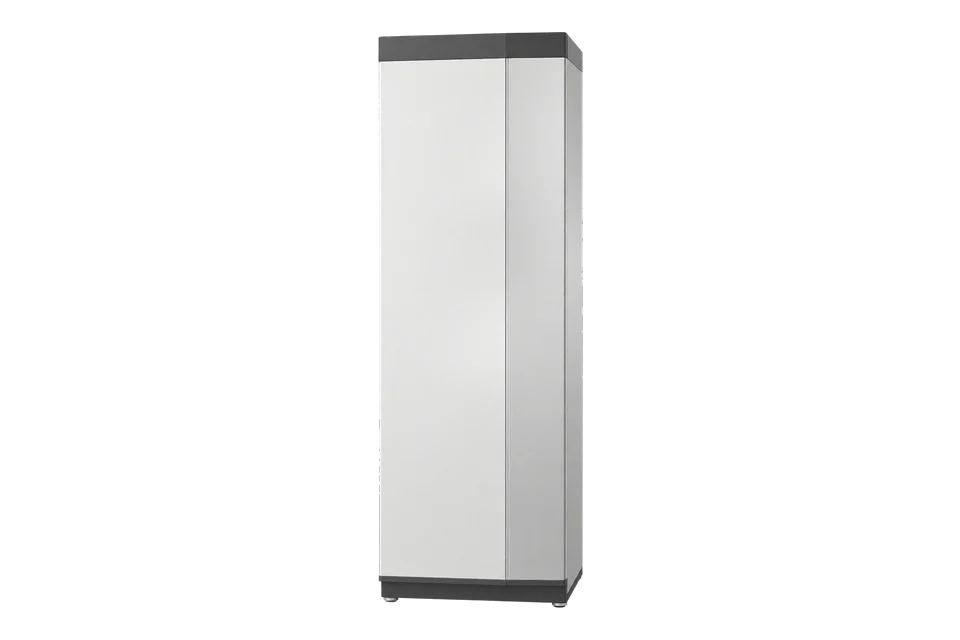
Ground-source heat pump
The S1256 belongs to NIBE's S-Series, whose local Modbus TCP/IP interface can expose heat-pump temperatures, compressor state and operating information. Enable the manufacturer's reading-only and trusted-IP settings, check software version 2.2.1 or later, and export the installed unit's register list. These operating values do not replace independently metered electricity and delivered heat for COP or SPF.
Compatibility
Compatible with EpiSensor Edge over Modbus TCP
NIBE's S-Series technical information explicitly covers S1256, names built-in Modbus TCP/IP from software 2.2.1, and lists read-only FC04 input registers for this model family.
S1256-8, S1256-13 or S1256-18 with S-Series software 2.2.1 or later and the local TCP/IP interface enabled. Confirm the exact product, activated accessories, firmware, exported register list, IP access and reading-only mode. S2125 with a separate indoor controller is a different topology.
Connect it with

The installed S1256 runs software 2.2.1 or later, reading-only mode and the trusted monitoring host are configured
- Modbus
- Edge
- Platforms
Models
| Models | Interface | Route into Edge |
|---|---|---|
| S1256-8, S1256-13, S1256-18 | Built-in S-Series Modbus TCP/IP on software 2.2.1 or later | Read from the S1256 controller, after exporting the registers available on that installed configuration. |
| S2125 outdoor heat pump with VVM S320 or SMO S40 | Separate outdoor unit and indoor/control module | Use the exact indoor controller's documentation and register export; this S1256 guide does not describe that topology. |
Specifications
NIBE identifies the S1256 as a ground-source heat pump with an integrated water heater, offered in 8, 13 and 18 kW classes in its European range. This is a smaller building unit; the guide does not imply that it is the right capacity for every commercial plant.2
- Product scope
- S1256-8, S1256-13 and S1256-18 ground-source heat-pump variants2
- Minimum interface software
- S-Series version 2.2.1 or later for Modbus TCP/IP1
- Local connection
- Modbus TCP/IP on port 502, restricted to a local private address and a trusted client IP1
- Polling boundary
- At most 100 registers per second and 20 registers per query1
- Temperature example
- Outdoor temperature BT1: input-register ID 1, FC04, signed 16-bit, °C with factor 101
- Operating example
- Compressor status: input-register ID 1100, FC04, 0 off or 1 on1
Interface
Documented measurements and integration boundaries for S1256.
- Read-only input registers cover outdoor, flow, return and brine temperatures, compressor status and current compressor frequency, subject to installed configuration.
- NIBE's common-register table includes alarm state, run time and internal energy or power-related values. Their measurement boundary and availability must be checked before use.
- For site COP or seasonal performance, meter the complete heat-pump electrical boundary and delivered heat separately, at matching intervals.
Assessment
S1256 S-Series controller with software 2.2.1 or later, local Modbus TCP/IP, reading-only and trusted-IP settings. No control or measured field installation is claimed.
- InteroperabilitySupported with conditions
- The exact product family has a manufacturer-documented local TCP interface, conditional on software, settings and the installed register export.12
- AccuracySupported with conditions
- The manufacturer specifies types and scales for operating values, but internal telemetry does not establish independently measured heat or whole-system electricity.1
- SecuritySupported with conditions
- NIBE provides trusted-IP restriction and reading-only mode. The TCP link itself is not described as encrypted; keep it on a protected private network.1
- ReliabilityNot yet assessed
- The document specifies polling limits but no measured connection availability or historical backfill guarantee.1
- RuggednessNot yet assessed
- The retained product page does not provide enough installation-environment evidence to score this interface for a particular plant room.2
- ScalabilitySupported with conditions
- NIBE documents a limit of 20 registers per query and 100 registers per second; a fleet design must account for those limits and controller availability.1
Setup
Read outdoor temperature BT1 from the S1256
NIBE's S-Series Modbus technical information lists outdoor temperature BT1 for S1256 as read-only FC04 input register ID 1, signed 16-bit, with a factor of 10. Export the installed unit's register CSV from menu 7.5.9 before saving a point configuration.
- Target
- S1256 local IP address, TCP port 502, with the Edge host allowed as a trusted IP and reading-only mode enabled
- Function
- FC04 Read Input Registers
- PDU start
- Try 1 decimal (0x0001) for NIBE register ID 1; reconcile the client's zero-based or one-based display with the exported CSV
- Length
- 1 register
- Decode
- Signed 16-bit integer divided by 10 °C; raw 215 (0x00D7) means 21.5 °C
- Acceptance
- Compare the decoded value with outdoor temperature BT1 in controller menu 3.1 at the same moment
Acceptance: Compare BT1 with the controller's operating-info display. If the read fails or gives an implausible value, check the exported register ID against the client's address convention, then the trusted IP and software version.
-
Identify the exact S1256 variant and installed S-Series software.
Confirm version 2.2.1 or later, the active accessories and the existing building controller before selecting registers.
-
Configure the site's protected Ethernet or Wi-Fi connection in menu 5.2, activate Modbus TCP/IP in menu 7.5.9, restrict the trusted IP and enable reading-only mode.
Do not expose port 502 to the public internet.
-
Export the register list from the installed unit to USB in menu 7.5.9.
Select only the values actually available for that variant and accessory set. Keep the manufacturer's 20-register-per-query and 100-registers-per-second limits.
-
Start with a single FC04 input such as outdoor temperature BT1, published ID 1 and signed 16-bit degrees Celsius with factor 10.
Confirm the client library's register-address convention against the exported CSV and the controller's operating-info display; do not assume an unverified offset.
-
Compare compressor status and temperature trends against local observations.
Record source device, unit, scale, timestamp and mode for every accepted point.
-
Keep all holding-register writes, AUX control, compressor blocking and hot-water changes outside this monitoring setup.
Add independent electricity and heat meters before reporting COP, SPF or delivered flexibility.
Common questions
- Does the S1256 need a separate Modbus accessory?
- NIBE documents built-in Modbus TCP/IP for the S-Series from software 2.2.1. Check the exact installed controller and firmware; the older Modbus 40 accessory belongs to different product arrangements.1
- Can Edge read the outdoor temperature without changing heating control?
- The S1256 table identifies outdoor temperature BT1 as a read-only FC04 input. Enable the controller's reading-only mode and trusted-IP restriction, then verify the installed register export and display value.1
- Can internal energy values be used as measured COP?
- Do not equate an internal operating value with delivered heat divided by the complete electrical input. A defensible COP or SPF boundary needs a heat meter and electricity metering for the relevant compressor, pumps and backup heat circuits.12
- Can the same setup be used on an S2125?
- The S2125 is an outdoor unit used with a separate indoor module or controller. Select that controller's exact register list and connection design; the S1256's integrated-controller assumptions do not transfer automatically.1
Related devices
Sources
- Modbus S-Series technical information, M12676EN (opens in a new tab) (PDF)
- S1256 ground-source heat pump product information (opens in a new tab)
Further reading
Product names and trademarks belong to their owners. Publication does not imply endorsement or a commercial relationship.