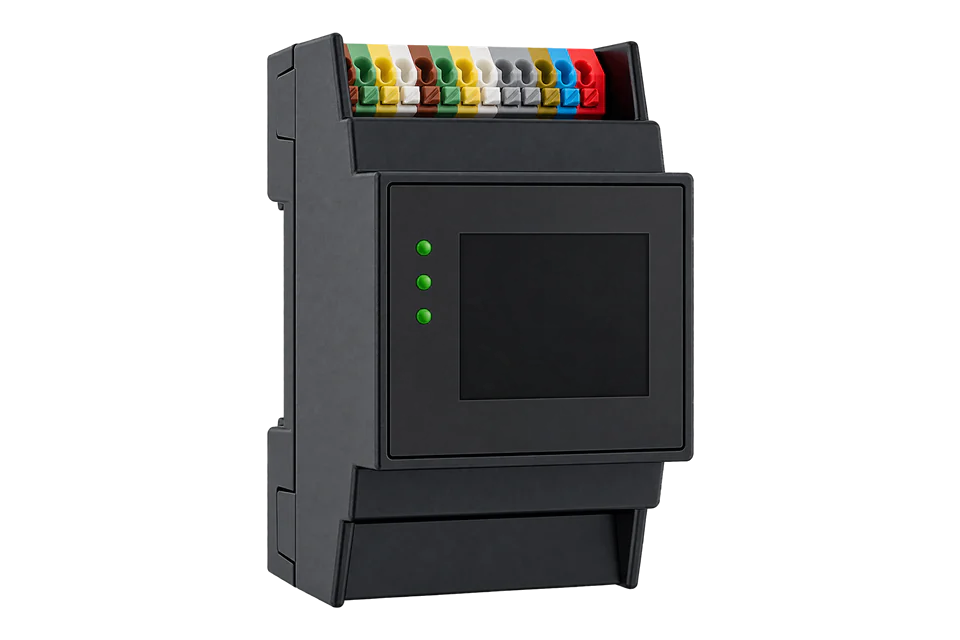
Solar-Log Base 2000
PV plant data logger
Solar-Log Base 2000 collects PV and meter data. Its separate Modbus TCP Free interface exposes aggregated plant measurements for external monitoring; the licensed PM interface handles grid-control commands.
Compatibility
Compatible with EpiSensor Edge over Modbus TCP
Solar-Log publishes a northbound monitoring map in Modbus TCP Free V1.12, July 2026, with FC04 addresses, units and word order. Edge reads that interface as a Modbus TCP client on port 502, unit ID 1.
Base 2000 with Modbus TCP Free enabled, from firmware 6.4.2. Site check: confirm that the update timestamp at address 3500 advances. Keep the monitoring connection separate from the commissioned PM and direct-marketing control channels.
Modbus TCP Free is enabled under Configuration | System | Access Control
- Modbus
- Edge
- Platforms
Models
| Models | Interface | Route into Edge |
|---|---|---|
| Solar-Log Base 2000 | Monitoring platform for plants up to 2 MWp | Confirm firmware 6.x and each supported component driver. |
| Licensed power-management functions | Modbus TCP PM and direct-marketing options | Use the documented Free interface for monitoring; leave PM control with its existing owner. |
Specifications
Base 2000 supports plants up to 2 MWp and connects supported inverters and meters through vendor-specific drivers. The component database and installed firmware determine each southbound path.12
Interface
Documented measurements and integration boundaries for Base 2000.
- FC04 provides plant power, voltage and energy; 32-bit values place the low word first.
- Every value must retain its source device and measurement boundary; inverter, meter, logger and controller values are not interchangeable.
Assessment
Base 2000 with Modbus TCP Free enabled. Keep its monitoring connection separate from the commissioned PM and direct-marketing control channels.
- InteroperabilitySupported with conditions
- Solar-Log publishes a northbound monitoring map in Modbus TCP Free V1.12, July 2026, and Edge reads it over Modbus TCP. The read examples use that document.123
- AccuracySupported with conditions
- The published Free map defines aggregated measurements, units and word order. It does not establish settlement-meter accuracy or individual-inverter breakdowns.123
- SecuritySupported with conditions
- The Free interface can be disabled in access control. Keep the endpoint on a protected network; the source does not establish encrypted transport or client authentication.123
- ReliabilityLimited
- Use the update timestamp to distinguish fresh plant data from an unchanged value. Zero indicates that live data is not available yet.123
- RuggednessSupported with conditions
- The manufacturer publishes enclosure and operating limits; the installation must still meet those limits.123
Setup
-
Record the complete identity
Photograph the nameplate and record the exact model, serial number, installed firmware and communication accessories. Do not select a point map from the family name alone.
-
Enable the Free monitoring interface
From firmware 6.4.2, enable Modbus TCP Free under Configuration | System | Access Control. Use the logger IP, TCP port 502 and unit ID 1 on a protected network.
-
Read freshness and plant power
Read FC04 address 3500, two registers, for the Unix update timestamp; zero means no live data. Read 3502, two registers, for Pac in W: PDU 04 0D AE 00 02. Decode U32 with low word first and big-endian bytes within each word. Synthetic words 0x3039, 0x0000 give 12345 W. Check that the timestamp advances and compare with the plant display.
-
Add energy and consumption
FC04 daily yield at 3508 and total yield at 3516 are two-register U32 values in Wh; divide by 1000 for kWh. Consumption power at 3518 uses W. Pac includes inverters and inverter-type meters; reconcile those assignments before adding independent meter readings.
Common questions
- Does Solar-Log provide a monitoring interface?
- Yes. Modbus TCP Free provides aggregated plant data. It is distinct from Modbus TCP PM and does not require the monitoring client to issue plant-control commands.3
Related devices
Similar devices
Sources
- Solar-Log Base manual, firmware 6.x (opens in a new tab) (PDF)
- Solar-Log Base technical data (opens in a new tab) (PDF)
- Solar-Log Modbus TCP Free V1.12, July 2026 (opens in a new tab) (PDF)
Further reading
Product names and trademarks belong to their owners. Publication does not imply endorsement or a commercial relationship.