Tuya · MeteringSDM01V1.5
Smart energy monitor for 3P+N system. Reports power, cumulative energy and power factor.
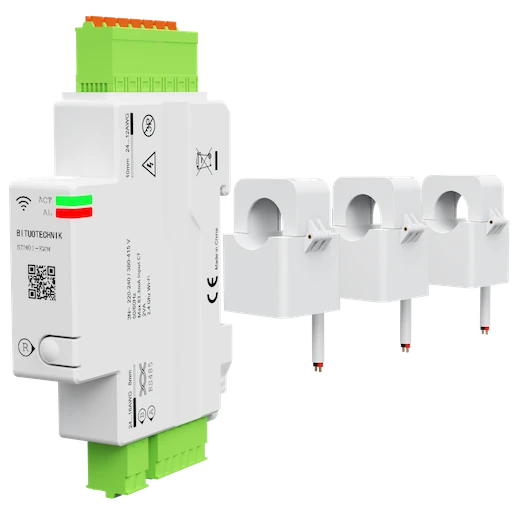
Connection
EpiSensor Gateway with Zigbee radio running Edge
Documented Zigbee support describes the path Edge would use. It is not an EpiSensor compatibility claim for this model.
Readings and controls
What the pinned upstream definition exposes for this exact model. Units and ranges are only shown when that source states them.
| Name | Type | Access | Unit | Range |
|---|---|---|---|---|
| voltage_a | numeric | Read | V | — |
| voltage_b | numeric | Read | V | — |
| voltage_c | numeric | Read | V | — |
| power_a | numeric | Read | W | — |
| power_b | numeric | Read | W | — |
| power_c | numeric | Read | W | — |
| current_a | numeric | Read | A | — |
| current_b | numeric | Read | A | — |
| current_c | numeric | Read | A | — |
| energy | numeric | Read | kWh | — |
| produced_energy | numeric | Read | kWh | — |
| power_factor | numeric | Read | % | — |
| power | numeric | Read | W | — |
| ac_frequency | numeric | Read | Hz | — |
| energy_a | numeric | Read | kWh | — |
| energy_b | numeric | Read | kWh | — |
| energy_c | numeric | Read | kWh | — |
| energy_produced_a | numeric | Read | kWh | — |
| energy_produced_b | numeric | Read | kWh | — |
| energy_produced_c | numeric | Read | kWh | — |
| power_factor_a | numeric | Read | % | — |
| power_factor_b | numeric | Read | % | — |
| power_factor_c | numeric | Read | % | — |
| update_frequency | numeric | Read and write | s | 5–3600 |
Edge template
Import the JSON in Edge → Settings → Device Templates. It sets the point map only. The Gateway connection, unit address and export names stay yours.
Tuya SDM01V1.5: energy-monitoring baseline
Portable Zigbee configuration for the SDM01V1.5 Edge registry profile. It sets the device update frequency to 60 seconds; Edge supplies the 23 read-only voltage, current, power, power-factor, frequency and imported/exported energy sensors. Export identifiers remain site-specific.
- Exact product
- SDM01V1.5
- Included
- 23 mapped points · 1 setting group
- Reviewed
Sign-in and approved Edge download access required.
What Edge creates from this Zigbee device
Edge recognises either registry identity shown below. What it creates for this model comes from the pinned Edge registry; the downloaded file adds only the 1 disclosed baseline setting.
Registry identities_TZE284_gomuk3dc/SDM01V1.5_TZE204_gomuk3dc/SDM01V1.5
Sensors 23
| Sensor | Edge ID | Unit | Reading | Registry property |
|---|---|---|---|---|
| Voltage A | 6911 | V | Instantaneous | voltage_a |
| Voltage B | 6912 | V | Instantaneous | voltage_b |
| Voltage C | 6913 | V | Instantaneous | voltage_c |
| Power A | 6914 | W | Instantaneous | power_a |
| Power B | 6915 | W | Instantaneous | power_b |
| Power C | 6916 | W | Instantaneous | power_c |
| Current A | 6917 | A | Instantaneous | current_a |
| Current B | 6918 | A | Instantaneous | current_b |
| Current C | 6919 | A | Instantaneous | current_c |
| Energy | 6920 | kWh | Cumulative | energy |
| Produced Energy | 6921 | kWh | Cumulative | produced_energy |
| Power Factor | 6922 | % | Instantaneous | power_factor |
| Power | 6923 | W | Instantaneous | power |
| AC Frequency | 6924 | Hz | Instantaneous | ac_frequency |
| Energy A | 6925 | kWh | Cumulative | energy_a |
| Energy B | 6926 | kWh | Cumulative | energy_b |
| Energy C | 6927 | kWh | Cumulative | energy_c |
| Produced Energy A | 6928 | kWh | Cumulative | energy_produced_a |
| Produced Energy B | 6929 | kWh | Cumulative | energy_produced_b |
| Produced Energy C | 6930 | kWh | Cumulative | energy_produced_c |
| Power Factor A | 6931 | % | Instantaneous | power_factor_a |
| Power Factor B | 6932 | % | Instantaneous | power_factor_b |
| Power Factor C | 6933 | % | Instantaneous | power_factor_c |
Settings 1
| Setting | Type | Accepts | Registry field |
|---|---|---|---|
| Update Frequency | Number | 5 to 3600 s, step 1 | exposes.update_frequency |
Export enabled and the export identifier stay site-specific on every mapped sensor: the template leaves both to the site.
Import into Edge
- Download the JSON template.
- In Edge, open Settings → Device Templates and choose Import.
- Apply it to the exact model, set the site connection and unit address, then prove one known value before enabling the rest.
Commissioning
A live socket is not a live measurement. Prove the decode, then keep the map.
-
Pair the device on the Gateway Zigbee radio in Edge.
-
Confirm the reported manufacturer and model match this page.
-
Prove one known reading or control before enabling the rest of the points.
Sources
Built from the pinned Device Directory snapshot. Product names and trademarks belong to their respective owners; publication does not imply endorsement, a commercial relationship, or that EpiSensor has tested this model.